


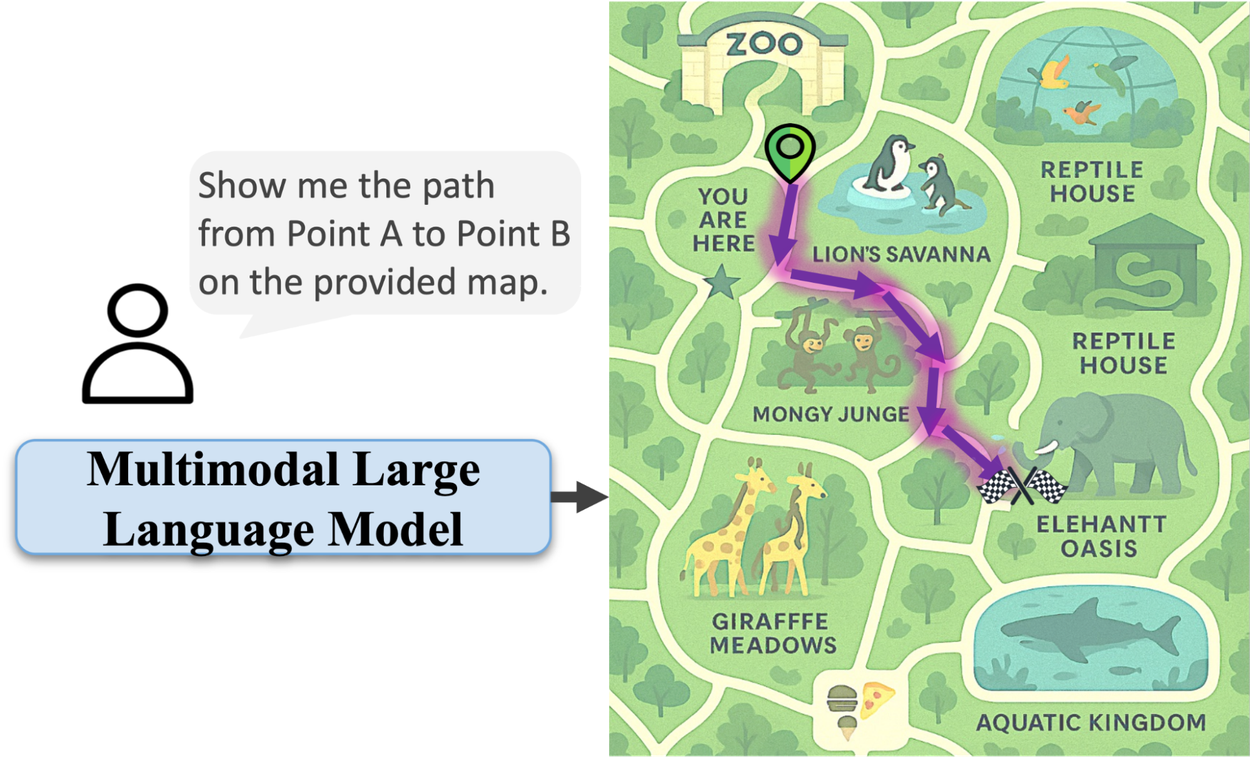
Look at a map of a mall or theme park. In seconds, your brain finds your way and plans the best route. You know what is a wall and what is a path. This skill, understanding space, is easy for us.
But, AI models that understand images and text often find this hard. They can see a zoo in a picture and name animals. Yet, they might not trace a path from the entrance to the reptile house. They could draw a line through an exhibit. This shows a big problem. Today's AI is good at seeing things. It is not good at knowing how things fit together.
We have a new system called MapTrace. It creates data to teach AI to trace paths on maps. Our work shows that AI can learn this skill with special data. We share a set of 2 million question and answer pairs. This data was made using Gemini 2.5 Pro and Imagen-4 Models. We hope this helps others study this area.
When given a start and end point on a map, the AI shows a valid path. The AI path follows the rules of the map. We saw that text in the maps sometimes looks wrong. But, we focus on how good the paths are. We think new image AI will fix these text problems later.
AI Models Struggle with Real-World Space
Why is tracing a path on a map hard for AI? It's about the data they learn from. AI models learn from many images and texts. They learn that the word "path" means sidewalks or trails. But, they don't learn the rules of moving. They don't know paths connect, you can't walk through walls, and a route is a list of steps.
The best way to teach this is with many maps. Each map would have paths drawn by hand. But, drawing paths perfectly takes a long time. It's too hard to do for a big AI model. Also, many good maps, like for malls or parks, are private. We can't use them for research.
This lack of data stops progress. Without enough examples, AI can't understand maps well. They see just pixels, not a place they can move through.
Our Solution: A System to Create Map Data
To fix this data problem, we made a system. It uses AI models like Gemini to make many good maps. This system helps us control the data. It makes paths that follow the rules. It avoids places you can't go. We don't need to collect real maps.
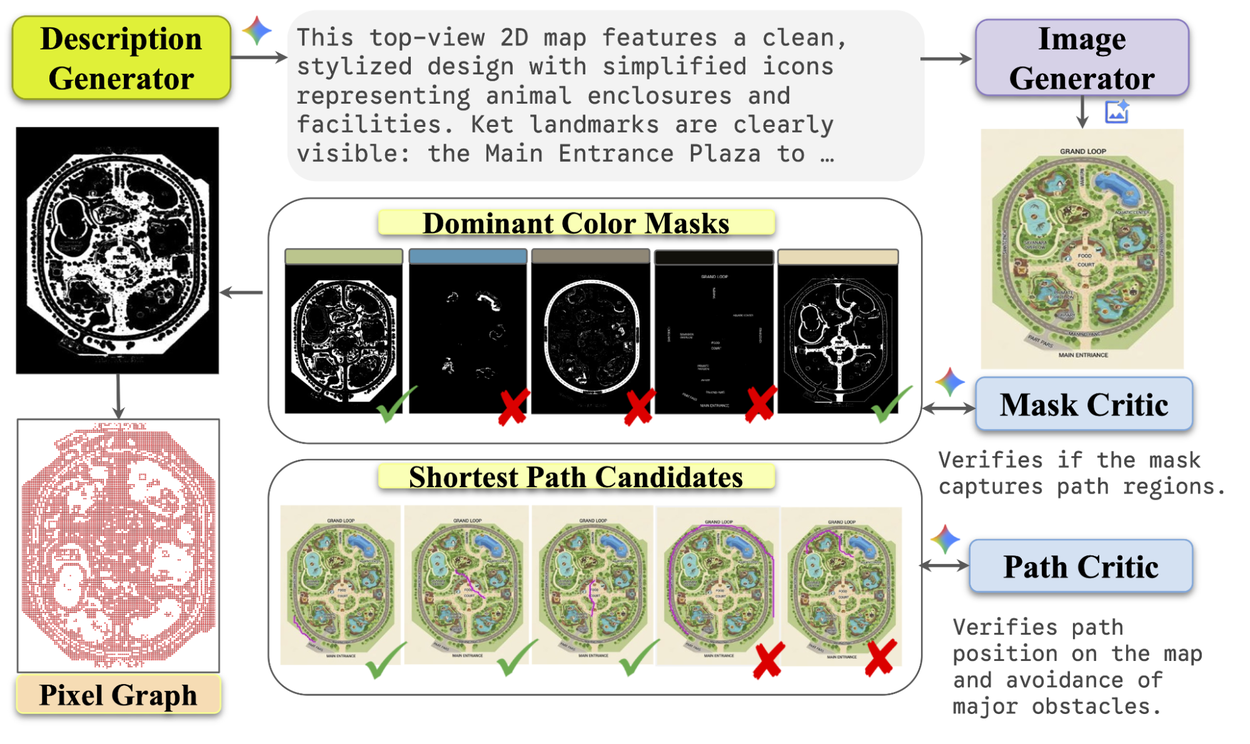
This system makes data for AI to trace routes on maps.
Our system has four steps. AI models help create and check the maps. This makes sure the data is good. It creates paths marked by pixels.
1. Making Many Different Maps
First, we use a language AI to write text ideas. These ideas describe different kinds of maps. For example, "a map of a zoo with paths" or "a mall with a food area." Then, we use a text-to-image AI to make map pictures from these ideas.
2. Finding Paths with an AI "Mask Critic"
Next, we find the parts of the map where you can walk. Our system groups pixels by color. This creates "masks" of walkways. But not all shaded areas are paths. So, we use another AI, a "Mask Critic." This AI checks each mask. It sees if it looks like real paths. It checks the map and the mask. If the AI thinks the mask has good paths, it says it's high quality. Only good masks move to the next step.
3. Building a Map Network (Graph)
Now we have a clean picture of paths. We change this picture into a network. This is like a digital map of roads. Points where roads meet are "nodes." Roads between them are "edges." This network shows how places connect. It helps us find routes.
4. Making Perfect Paths with an AI "Path Critic"
Finally, we pick many start and end points. We use a math method called Dijkstra's algorithm. It finds the shortest path between points. Then, another AI, a "Path Critic," checks the path. It looks at the path on the map. It gives a thumbs-up or thumbs-down. This makes sure the path makes sense. It stays on paths and looks like a real route.
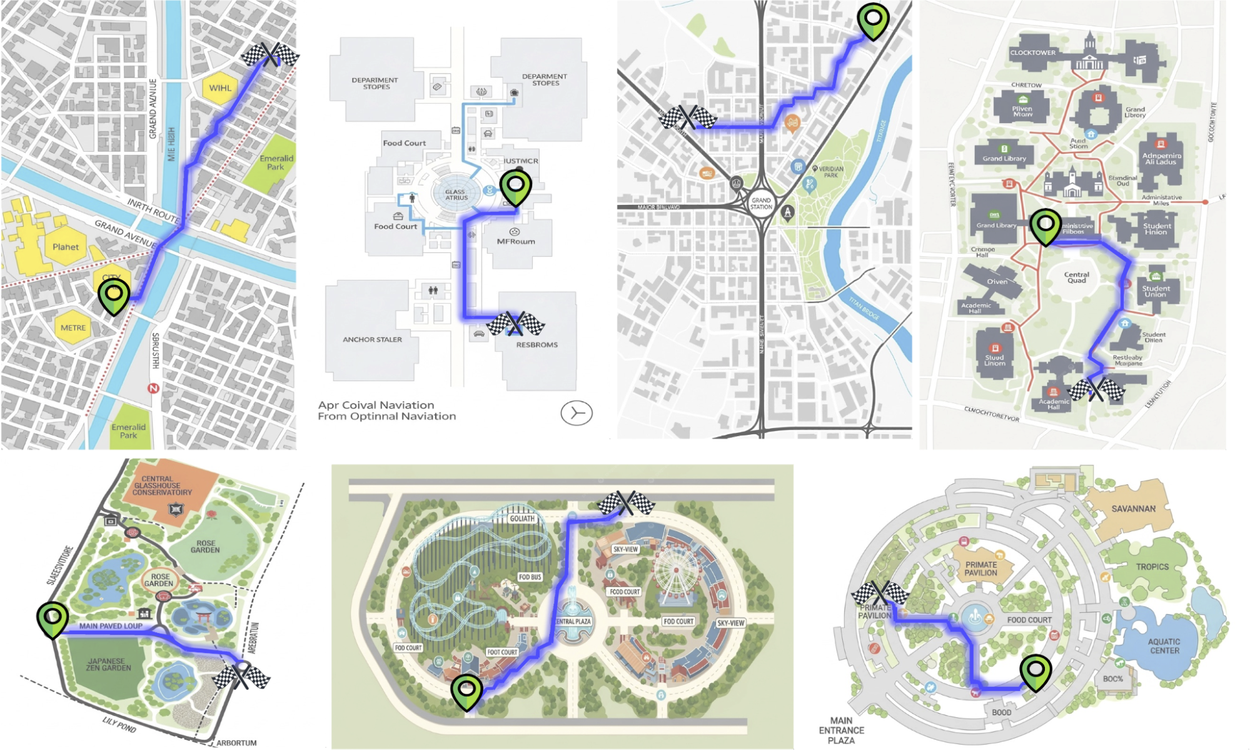
Here are example paths made by our system.
This system helped us create a dataset. It has 2 million maps with paths. The maps sometimes have text errors. But we focus on the paths themselves. We think new AI image tools will fix these errors.
AI Gets Better at Space Reasoning
Does training with this data work? We trained AI models on a small part of our data. We used models like Gemma 3 27B and Gemini 2.5 Flash. Then, we tested them on new maps they had not seen. We used a test called MapBench.
We measured how well the AI traced paths. We used a score called NDTW. A lower score means better path following. The image below shows how NDTW works. It compares a correct path (blue) to a predicted path (red). It shows how AI finds matching points. It also shows cost maps. These help find the best way to match the paths. The last part shows a 1D view. It shows how AI lines up paths that are similar but have different speeds or points.
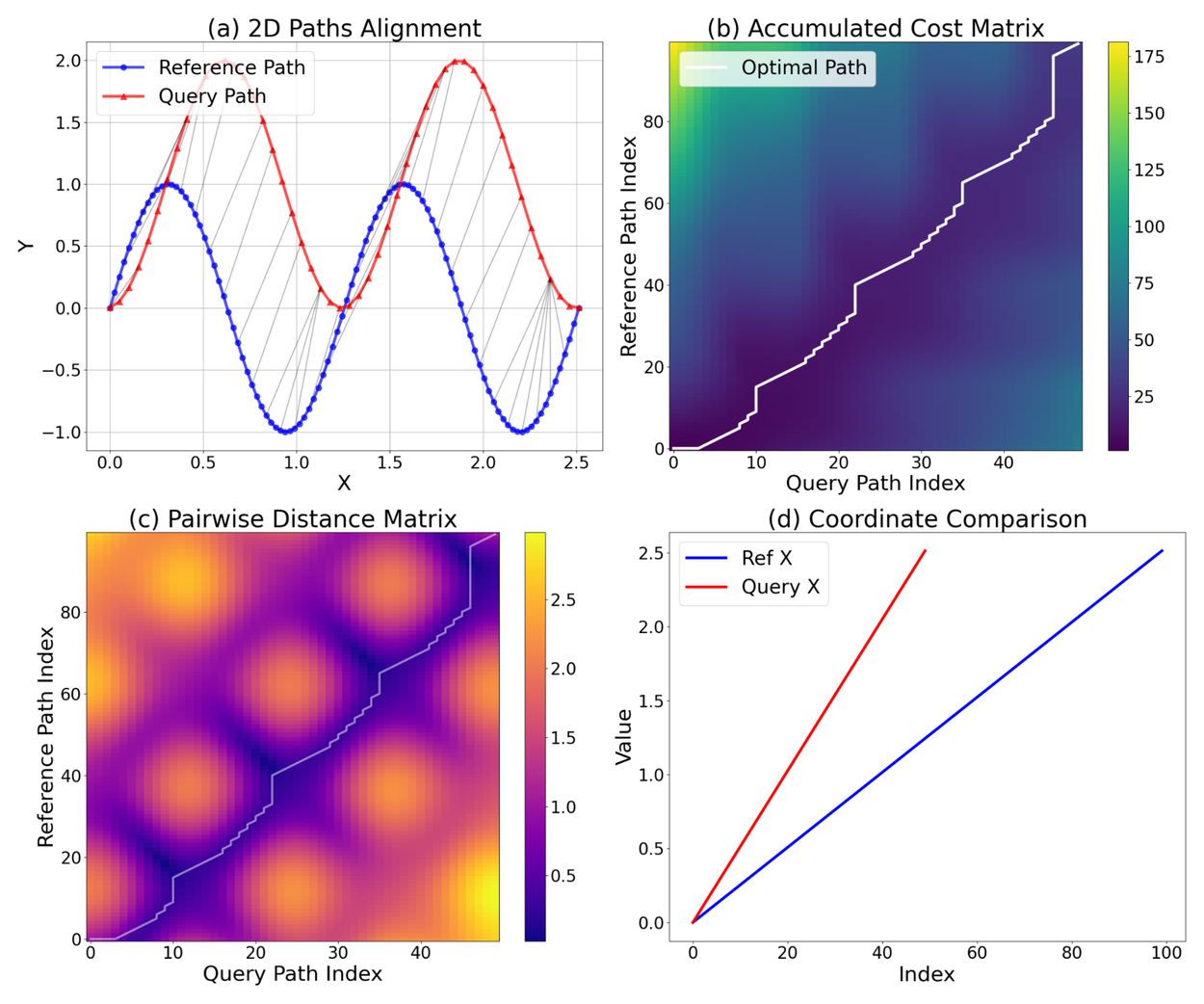
This shows how we compare two 2D paths using dynamic time warping.
Training on our data made the AI models much better. The Gemini 2.5 Flash model had a lower NDTW score after training. It performed the best overall.
More importantly, the AI models became more reliable. They could make a good path more often. The Gemma model got better by 6.4 points in its success rate. Its NDTW score also improved. This means the AI didn't just get more accurate. It failed much less often.
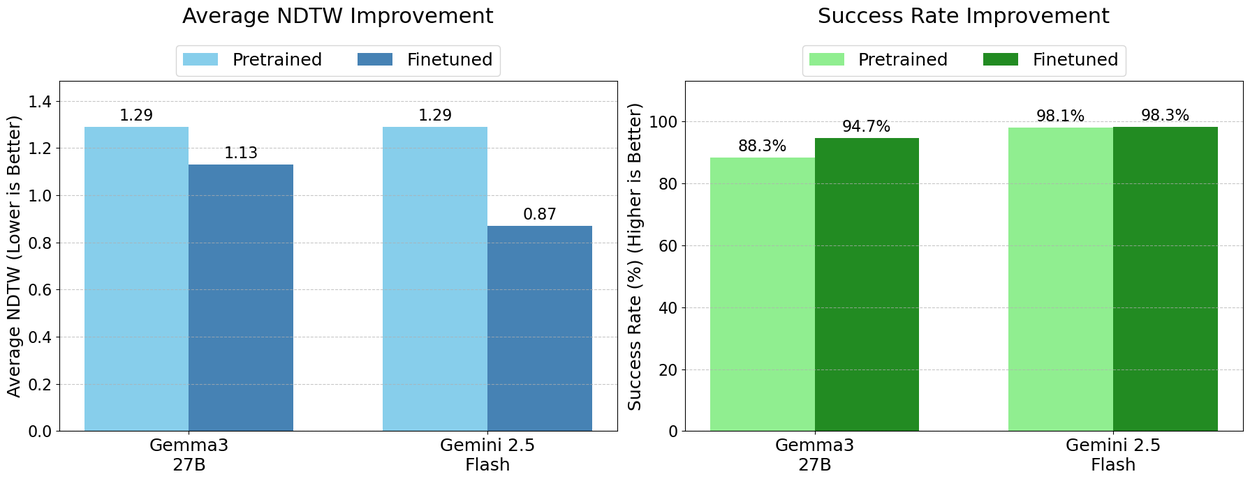
This chart shows how training on our data improved AI performance. We saw better NDTW scores and a higher Success Rate (making a good path).
These results show our main idea. AI models don't naturally understand space. They need to be taught. With the right data, even fake data, we can teach AI to understand and move through maps.
How Good Were Our AI Critics?
For the Path Critic AI, we checked 120 decisions. We looked at 56 maps. The AI was correct 76% of the time. It wrongly called bad paths "good" 8% of the time. Errors happened when the AI thought background colors were paths. Or it missed small paths in big open areas. For the Mask Critic AI, we checked 200 judgments on 20 maps. It was correct 83% of the time. It wrongly called bad masks "good" 9% of the time. Mistakes happened when background colors looked like paths. Or when small things like text got into correct masks. Thin paths were also sometimes marked as invalid.
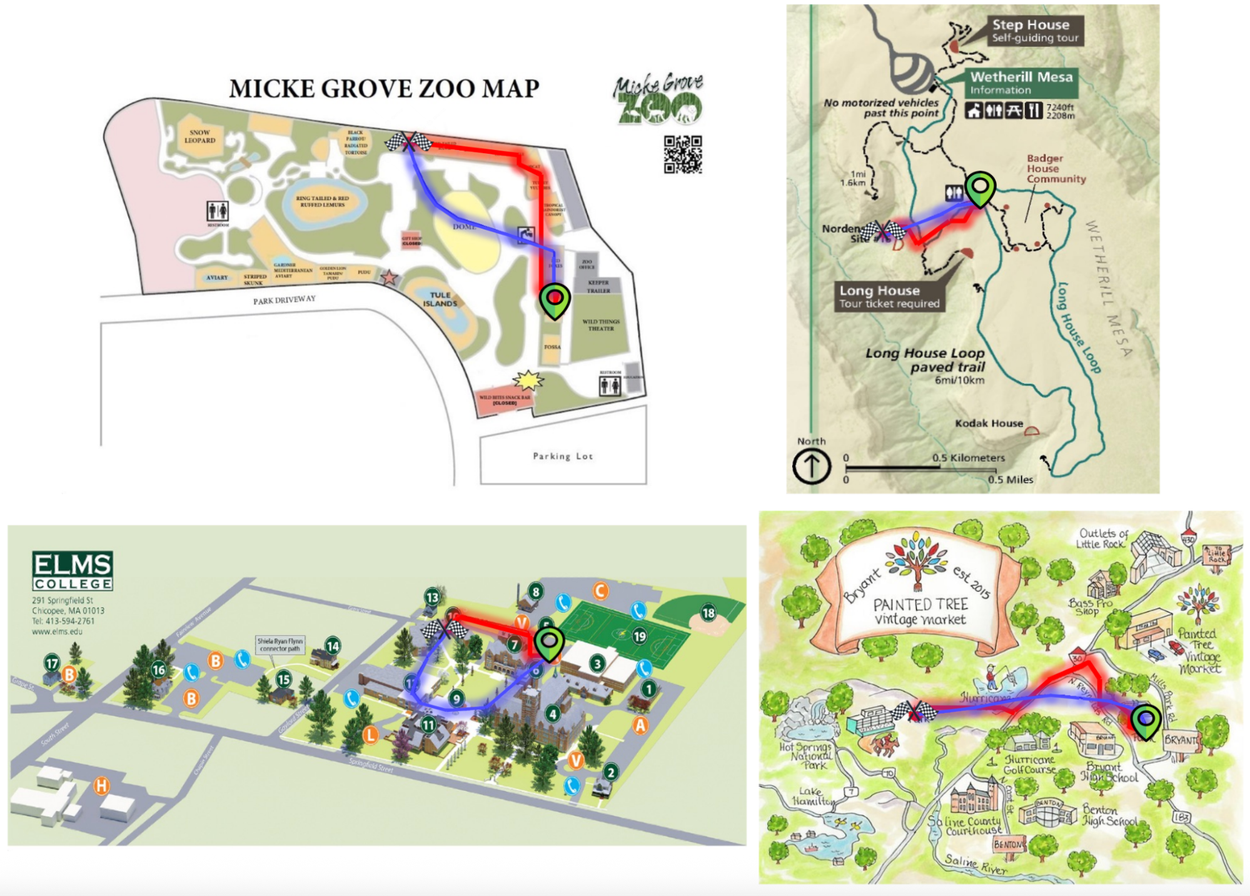
This shows a comparison. The trained Gemini-2.5-Flash (red) is better than the original model (blue). The trained AI follows routes better and avoids wrong areas.
What Comes Next
Being able to understand paths and how places connect opens up many new uses. These include:
- Better navigation tools: An AI that can look at a satellite image or a train map and give clear, easy directions.
- Smarter robots: Robots that can move around inside places like warehouses or hospitals by just looking at a floor plan.
- Help for people with vision problems: Tools that can clearly explain a path through a building, step by step.