


Run Powerful AI on Your Laptop
You can now use strong AI on your own computer. The models here work on regular laptops. They can do special jobs very well. You might need to agree to terms or log in to download some models, like Llama and Gemma. But once you have them, they run right on your device.
This guide shows you 7 useful small AI models. We ranked them by how well they fit different jobs. All of them have worked in real projects. You can run them on most laptops.
Good to know: Small models get updates often. New versions come with better features and can handle more text. This guide helps you pick the right model family. Always check the official model page or Ollama for the latest details before you start using a model. Look for license rules and settings.
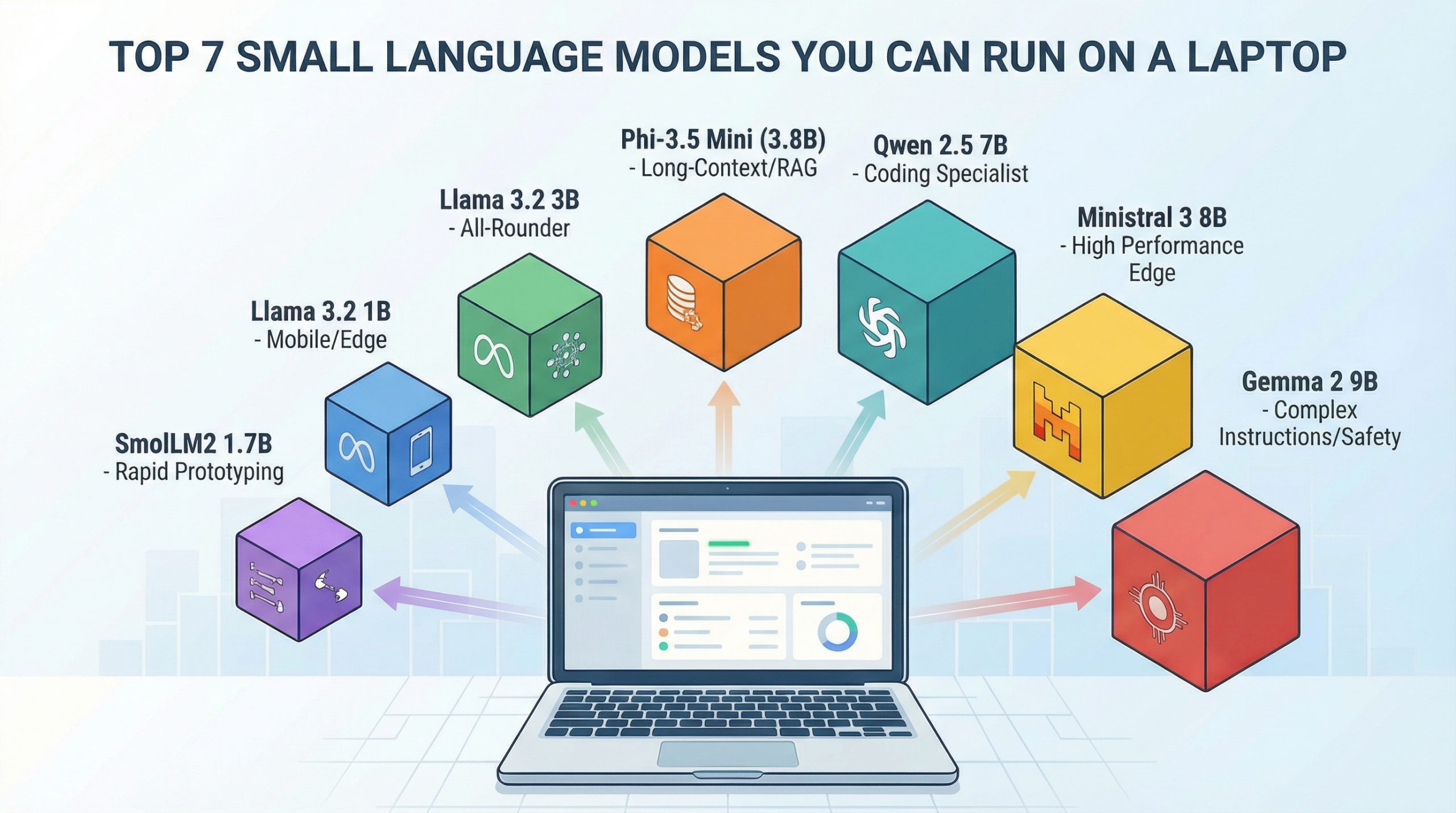
1. Phi-3.5 Mini (3.8 Billion Parts)
Microsoft’s Phi-3.5 Mini is great for developers. It's perfect for building systems that find and use information from documents on your own computer. This model came out in August 2024. It helps with tasks that need to read many documents without sending data to the cloud.
Reads Long Texts Easily. Phi-3.5 Mini can read very long texts. This is good for systems that need to understand lots of information. Many other models that are this size can only read shorter texts. Some versions might use shorter text limits by default. Always check the settings for the longest text you can use.
Best for: Understanding long texts (like books or guides) · Writing and fixing computer code · Systems that search many documents · Talking in different languages.
What You Need: If the model is made smaller (4-bit), you need 6-10GB of memory (RAM). You need more for very long texts. If it’s full size (16-bit), you need 16GB RAM. Best to have a modern laptop with 16GB RAM.
Get and Use Locally: Find the Phi-3.5 Mini Instruct model weights on Hugging Face. Follow the instructions there. If you use Ollama, get the Phi 3.5 model. Check the Ollama page for the exact settings you need. (Use: ollama pull phi3.5)
2. Llama 3.2 3B
Meta’s Llama 3.2 3B is a good all-around model. It follows instructions well. You can also change it for your needs. It's fast enough for apps you use often. If you don't know where to start, try this model.
It's a Good Balance. This model isn't the absolute best at one thing. But it's good at many different jobs. Meta supports 8 languages. It learned from data in even more languages. It follows instructions well, so it's useful for many things.
Best for: Talking and asking questions · Making long texts shorter · Sorting texts into groups · Helping customers with questions.
What You Need: If the model is made smaller (4-bit), you need 6GB RAM. If it’s full size (16-bit), you need 12GB RAM. It's best to have at least 8GB RAM for it to work smoothly.
Get and Use Locally: Find it on Hugging Face from meta-llama. You must agree to Meta's license. You might need to log in. For Ollama, use this command: ollama pull llama3.2:3b.
3. Llama 3.2 1B
The 1B version is smaller and uses less power. This is the model to use when you need AI on phones or small computers. It works well in places with limited power or space.
It Works on Phones. A small 1B model only needs 2-3GB of memory. This makes it possible to use on phones. Privacy is better, and you don't need internet. Fast phones can run it well. Your phone might get warm.
Best for: Simple sorting tasks · Basic questions about specific topics · Looking at logs for useful info · Using on phones and small devices.
What You Need: If the model is made smaller (4-bit), you need 2-4GB RAM. If it’s full size (16-bit), you need 4-6GB RAM. It can work on modern smartphones.
Get and Use Locally: Find it on Hugging Face from meta-llama. You might need to log in. For Ollama, use this: ollama pull llama3.2:1b.
4. Ministral 3 8B
Mistral AI made Ministral 3 8B for devices that need good performance but are small. It's as good as bigger models but uses less power. It's a good choice for laptops.
Works Well in Small Spaces. The Ministral models are made to give good results quickly on normal computers. This makes it a strong choice for real projects. It's better than 3B models. It uses smart technology to work well for its size.
Best for: Solving hard problems · Talking over many turns · Writing computer code · Understanding things deeply.
What You Need: If the model is made smaller (4-bit), you need 10GB RAM. If it’s full size (16-bit), you need 20GB RAM. It's best to have 16GB RAM to use it well.
Get and Use Locally: There are different versions of the “Ministral” models. Older ones have different licenses. Newer Ministral 3 models are free to use for business. For easy use on your laptop, try the Ollama command: ollama pull ministral-3:8b. You might need a new Ollama version. Check the Ollama page for details.
5. Qwen 2.5 7B
Alibaba’s Qwen 2.5 7B is the best at computer code and math problems for its size. If you need to write code, study data, or solve math, this model is better than others.
Special for Certain Jobs. Qwen was trained a lot on code and tech subjects. It understands how code works. It can fix code and create solutions that work better than general models.
Best for: Writing and finishing computer code · Solving math problems · Understanding tech guides · Talking in Chinese and English.
What You Need: If the model is made smaller (4-bit), you need 8GB RAM. If it’s full size (16-bit), you need 16GB RAM. It's best to have 12GB RAM for good results.
Get and Use Locally: Find it on Hugging Face from the Qwen group. For Ollama, use this command: ollama pull qwen2.5:7b-instruct.
6. Gemma 2 9B
Google’s Gemma 2 9B is the biggest model on this list. At 9 billion parts, it's large for a small model. But it's as good as models with 13 billion parts. Use this when you need the best quality your laptop can give.
Safe and Follows Orders. Gemma 2 was trained to be safe. It will refuse bad requests more often. It follows hard, multi-step orders very well.
Best for: Following complex orders · Jobs needing careful safety checks · Asking general knowledge questions · Checking content.
What You Need: If the model is made smaller (4-bit), you need 12GB RAM. If it’s full size (16-bit), you need 24GB RAM. It's best to have 16GB RAM or more for real projects.
Get and Use Locally: Find it on Hugging Face from the google group. You need to agree to Google’s terms. You might need to log in. For Ollama, use a command like: ollama pull gemma2:9b-instruct-*. Ollama has different versions. Choose the one for your needs.
7. SmolLM2 1.7B
Hugging Face’s SmolLM2 is one of the smallest models. It's made for trying things out quickly and learning. It's not ready for big projects. But it's great for testing ideas and seeing how small models work.
Fast and Easy to Use. SmolLM2 works very fast. This makes it perfect for trying new ideas. Use it to test your setup before using bigger models.
Best for: Trying ideas fast · Learning and testing · Simple text jobs (like finding feelings in text) · School projects.
What You Need: If the model is made smaller (4-bit), you need 4GB RAM. If it’s full size (16-bit), you need 6GB RAM. It can run on most modern laptops.
Get and Use Locally: Find it on Hugging Face from HuggingFaceTB. For Ollama, use this: ollama pull smollm2.
Pick the Best Model for You
The model you pick depends on what you need and what you have. For reading long texts, choose Phi-3.5 Mini. If you are just starting, Llama 3.2 3B is good for many things. For phones and small devices, Llama 3.2 1B is the smallest. For the best quality on a laptop, use Ministral 3 8B or Gemma 2 9B. If you work with code, Qwen 2.5 7B is best. For quick tests, SmolLM2 1.7B is the fastest.
You can run all these models on your computer after you get them. Some models, like Llama and Gemma, need you to agree to rules. You might need a special login. Model versions and settings change. Always check the official pages for the latest rules and options. You can use tools like llama.cpp to run smaller versions of models.
It's easier than ever to run AI on your own computer. Pick a model, try it out, and see what you can do!